Operating a Cyber Range with Security Onion—Windows 11, 2026
In both the Security Onion: Creating a Virtual Lab Environment—Windows 11, 2026 and Security Onion: Creating a Virtual Lab Environment—macOS, 2022 series, I explained how you can create a virtualized lab environment, or cyber range, monitored by Security Onion using VMware desktop virtualization software.
To review, here is the network diagram from Security Onion: Creating a Virtual Lab Environment—Windows 11, 2026: 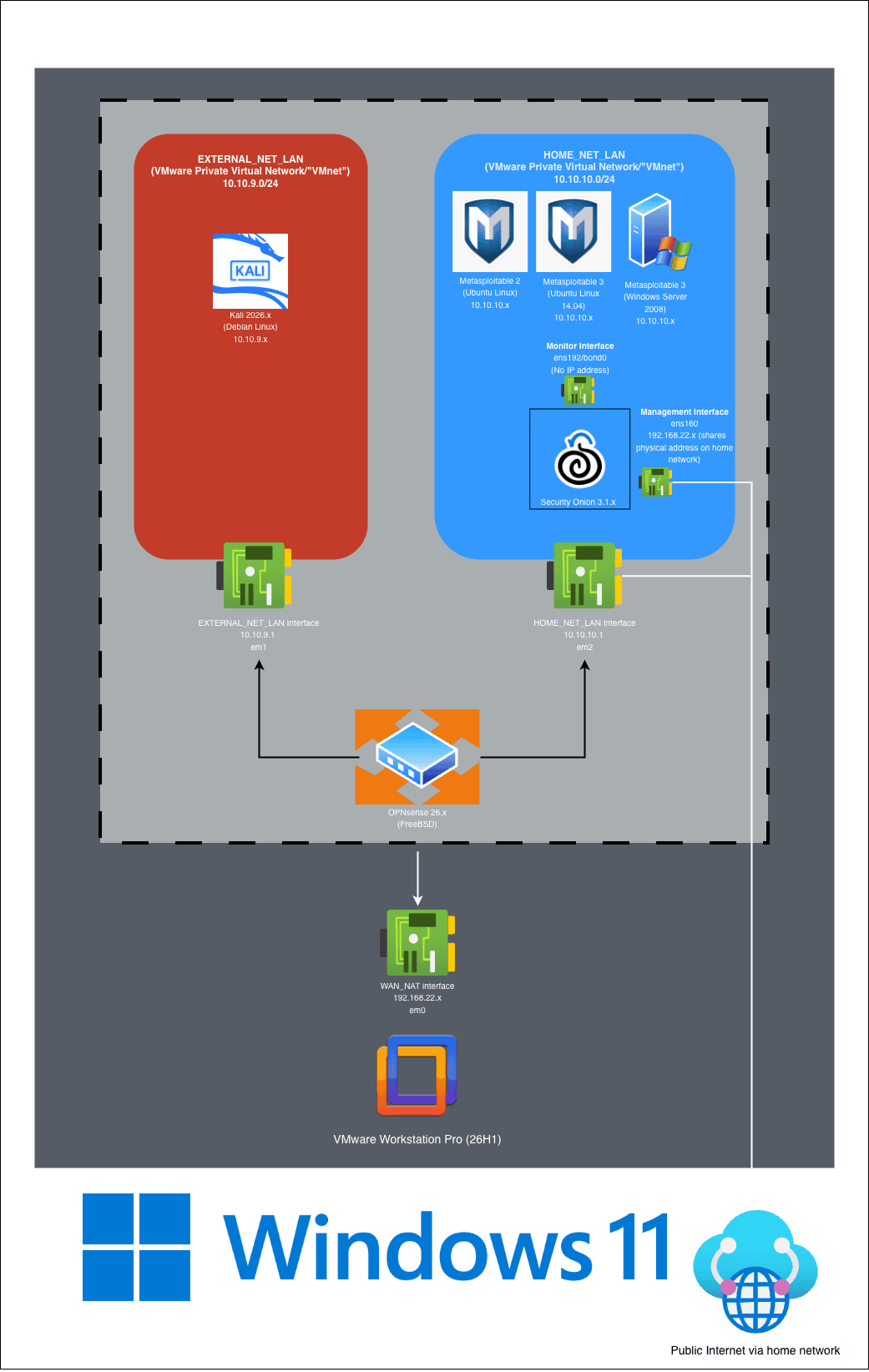
In this architecture, HOME_NET_LAN represents the network that you are seeking to protect with Security Onion. Security Onion is configured to monitor network traffic within this designated IP address space and alert on potentially malicious activity. We can attach target machines—in my case, Metasploitable VMs—to this network to stand in as our (vulnerable) assets. In this lab, EXTERNAL_NET_LAN stands in for the public or “untrusted” networks where threat actors may reconnoiter and attack HOME_NET_LAN. In this case, a Kali virtual machine is the threat actor.
This lab’s architecture is very extensible, and you can change its configuration, the placement of hosts on the different networks, and many other things, both in Security Onion and the wider environment. While we need the OPNsense virtual machine to provide network infrastructure that makes everything work (in particularly, a virtualized SPAN/TAP port for Security Onion’s monitor interface), you can even use OPNsense’s features to make your “HOME_NET” more realistic and secure, such as by adding the firewall functionality back in, segmenting with VLANs, and more.
If you have been going in order, so far the tutorials have only dealt with creating this environment and setting up Security Onion. While those tutorials may have taught you a lot about how to create and manage virtual machines and virtual networks, there’s not a lot in there about the whole purpose of the lab: the “cyber range” part. This tutorial series will introduce you to how to start using Security Onion. I will also demonstrate a couple of exercises using the Kali virtual machine to reconnoiter and attack the Metasploitable virtual machines, introducing you to tools like Nmap, Metasploit, BurpSuite, and Zap. Then you can go full circle by using Security Onion’s capabilities to review alerts and log data of that activity to see it through a defender’s eyes.
I’m going to start with an Introduction to Security Onion (2026), showing you how to access Security Onion via SSH or through the web management interface and exploring its features.